An AI agent in SSMS — an agentic pair-DBA, under your control
“Agent” is an overloaded word. In SQL Sage — an extension for SQL Server Management Studio 22 — it means the assistant works in a multi-step loop: it gathers context, calls database tools, reads what comes back, and decides the next step, rather than answering once from a single prompt. What it is not is a bot turned loose on production. The loop is read-only by default, and every write or schema change stops at a confirmation gate. This page is exactly what that agentic behaviour does, and where it deliberately stops.
On this page
01What “agent” means here — and what it doesn't
A lot of tools call themselves “agentic”. Some mean a chatbot with a nicer prompt; some mean a system that changes real infrastructure unattended. SQL Sage is deliberately in between, and it is worth being precise about which.
What it is. The assistant runs a genuine multi-step agentic loop. Ask it why a query is slow and it does not guess from the SQL text alone — it collects the execution plan, reads wait statistics and Query Store, checks the indexes that already exist, and only then explains, often after several tool calls you can watch happen. Each step is chosen in light of what the previous step returned. That is the agentic part: it plans, acts, observes, and continues.
What it is not. It is not an autonomous operator with a free hand on your database. There is no mode in which it applies an UPDATE, a DROP or an ALTER because it decided that was the fix. The loop is read-only by default, and the instant a step would change data or schema, control returns to you. So the honest one-line description is: an assistant that works agentically, with safeguards — not a fully autonomous agent.
02The agentic loop, step by step
Concretely, a single question can drive a sequence like this — each step feeding the next:
- Gather context. The chat is grounded in the query window and connection you are on, so it starts knowing the server, database, engine edition and version. It reads the relevant schema — table, column and index metadata from the system catalogs — before reasoning.
- Choose and call a tool. From a set of authored, reviewed database tools, the model picks the one that answers the current sub-question — pull the execution plan, read wait statistics, list the blocking chain, query Query Store — and calls it. These are deterministic queries we wrote, not SQL the model improvises.
- Interpret the result. It reads the numbers that came back — real values from your instance, not invented ones — and forms the next hypothesis.
- Take the next step. Based on what it found, it either calls another tool, runs a
SELECTto confirm, or reaches a conclusion. A diagnosis is usually several passes, not one. - Propose, then wait. When the answer is a change — a new index, a rewrite, a statistics update — the assistant writes the SQL and hands it to you. Applying it is your button, not its. That is the end of the loop's autonomy.
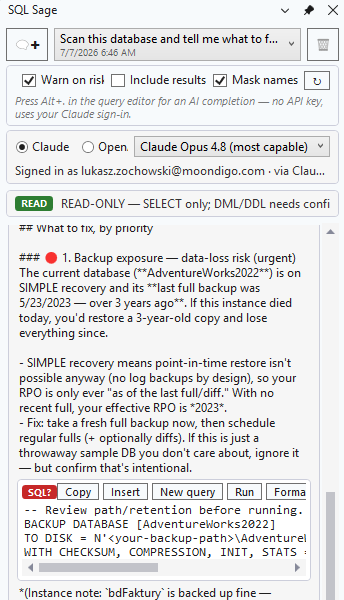
The assistant works in the context of one pinned connection, so every step in the loop is grounded in a known server and database.
03What it actually reads and runs
The loop is only as good as what it can measure, so the assistant reasons about the server in front of it rather than about SQL Server in general. It has roughly two dozen authored tools — deterministic queries we wrote and reviewed — and the model chooses which to call and interprets what comes back; it does not invent the numbers.
- Reads schema, not data. Table, column and index metadata come from the system catalogs, with SMO used only to script object definitions. That is the shape of your database, which is what the reasoning needs.
- Reads real server state. The estimated and actual execution plan, wait statistics, Query Store history and regressions, the live blocking chain, deadlock history, missing-index recommendations cross-checked against the indexes you already have — every conclusion cited to a real value.
- Runs reads by itself. A genuine
SELECTthe assistant needs to confirm a hypothesis executes automatically, read-only, on a fresh connection so nothing from your query window leaks in — capped by a row limit and a timeout. - Diagnoses multi-step. “Why is it slow?”, a health check, or on-call triage are not single answers — they are chains of tool calls whose order depends on what each returns.
- Proposes fixes; applies nothing. Rebuilds,
UPDATE STATISTICS,CREATE INDEX,ALTER DATABASE, query rewrites — all written for you to review and run yourself. The write happens only after you say yes.
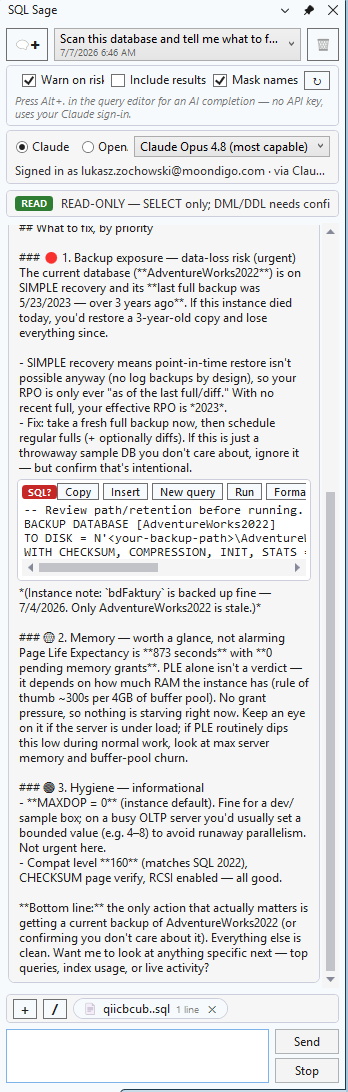
A health check is the loop in one shot: several read-only tool calls, interpreted together into a prioritized report — with a fix script handed over, not applied.
04Where the autonomy stops: the safety gate
The reason the loop is safe to let run is not that the model is well-behaved — it is that a deterministic gate sits between anything the AI writes and your server. Before execution, every batch is split on GO the way SSMS splits it and parsed into a syntax tree by ScriptDom — Microsoft's own T-SQL parser, the TSql180Parser — then classified as Read, Write, DDL or Unknown. A batch takes the worst class any statement in it earns.
- Read runs automatically. A genuine
SELECTexecutes read-only on a fresh connection, capped by a row limit and a timeout, with a lock timeout so a preview cannot sit on a blocked resource. - Write and DDL stop. A confirmation dialog shows the exact SQL, in full, before anything executes — every time, with no “don't ask again”.
SELECT … INTOcounts as a write because it creates and populates a table;NEXT VALUE FORcounts because it advances a sequence. - Unknown is treated as dangerous. If the batch will not parse, or it hides behind
EXEC/sp_executesql, or the classifier cannot positively recognise it as safe, it is classed Unknown and needs the same confirmation. The default answer to “I can't prove this is a read” is no.
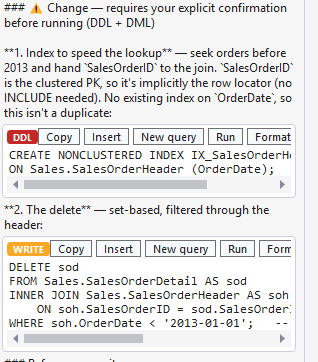
Every SQL block the assistant writes is classified before it can run. Writes and DDL are held, badged, and shown in full.
This is why the gate matters more than any instruction in a prompt could: a model cannot talk its way past a gate that is not made of words. The classification is code, run on the SQL text, not a request the model is trusted to honour. That is the exact line where the agent's autonomy ends and your judgement begins.
05Your AI access, private, and logged
Three facts round out how the agent runs, each covered in more depth elsewhere on the site.
- Your own AI access. The loop runs on your own Claude or ChatGPT/Codex account, driven through the local CLI where you sign in, so there is no separate key to create and none for us to hold. AI usage is not included — your plan with Anthropic or OpenAI covers it. Advanced users can instead paste an Anthropic key (BYOK), stored encrypted with Windows DPAPI. The mechanics are on how CLI sign-in works.
- Private by default. What leaves your machine is your query text and the shape of your schema, plus the diagnostics the tools collect and distilled execution plans — not the rows in your result grids. Sending data is double-gated: off by default, and the first send in a session asks for explicit consent. Because inference runs on your own account, your direct relationship with the provider governs how that context is handled.
- Logged. The queries the agent runs, and the writes it was stopped from running, are appended to a local, hash-chained audit log under
%LOCALAPPDATA%\SqlSage\audit\— local-only, with no network path out of the audit code, on by default and switched off with Audit SQL — and are exportable as an evidence pack. Not logged: schema look-ups (table lists, column definitions), a few read-only diagnostics (wait stats, plan-cache top queries, active requests, deadlock history) and repository reads; the health check and Incident Mode are logged by name, without their SQL.
06How it works, briefly
SQL Sage installs into SQL Server Management Studio 22 on Windows and runs as part of the SSMS process on your own machine — not a web app, not an online SQL editor. The assistant lives in a dockable panel beside the query editor, drives the AI account you already have, and reaches your database through one authored, gated channel. That is the whole surface the agentic loop runs on.
For the step-by-step walkthrough see the documentation; for how SQL Sage lines up against GitHub Copilot in SSMS and SsmsAgentic — including where per-statement approval and audit logging differ — see the side-by-side comparison.
AI usage not included: SQL Sage needs your own AI access (Claude Code on a paid Claude plan, the Codex CLI with a ChatGPT account, or your own Anthropic API key). See pricing
07FAQ
Is SQL Sage autonomous?
No — not in the sense of a bot left to change production on its own. It works agentically: it plans and runs a multi-step loop, gathering context, calling database tools, reading the result and deciding the next step. But that loop is read-only by default. Reads run automatically; every write and every DDL statement stops at a confirmation dialog that shows the exact SQL before anything executes. So it acts on its own only where acting cannot change your data — the moment it would, control returns to you.
Can it run destructive SQL on my database?
Not without you. Before execution every batch is parsed by ScriptDom — the same T-SQL parser SSMS uses — and classified as Read, Write, DDL or Unknown. A genuine SELECT runs read-only, capped by a row limit and a timeout. Anything that writes, changes schema, or cannot be proven safe is held for a confirmation dialog showing the full SQL, every time, with no “don't ask again”. The gate is a deterministic parser, not a prompt instruction, so the model cannot talk its way past it.
What does the agent actually read from my server?
Schema and server state, not your data. It reads table, column and index metadata from the system catalogs (with SMO used only to script object definitions), the estimated and actual execution plans, wait statistics, Query Store history, the live blocking chain and other diagnostics — through about two dozen authored, reviewed tools rather than SQL the model improvises. Result-grid rows never leave your machine unless you opt in per session.
Does the agent need an API key?
No separate key. SQL Sage drives the Claude or ChatGPT/Codex access you already have through the local CLI, where you sign in, so there is no key to create and none for us to hold — but AI usage is not included (Claude Code needs a Claude plan that includes it or an Anthropic Console account, and Codex a ChatGPT account). Advanced users can instead paste their own Anthropic key (BYOK), stored encrypted with Windows DPAPI, but it is not required.